
Introduction
In today’s digital world, keeping your devices safe from viruses, malware, and cyber threats is more important than ever. Cybercriminals are constantly creating new ways to steal personal information, damage systems, or access sensitive data. The good news is that you don’t always need to spend hundreds of dollars to protect your devices. Free antivirus & security apps offer an accessible way for beginners and intermediate users to safeguard computers, laptops, and smartphones without breaking the bank.
From scanning your system for threats to providing real-time protection, these apps are designed to make cybersecurity easy and efficient. Many free apps also include extra features like web protection, password management, and safe browsing tools. While premium versions have advanced functionalities, free options are often sufficient for everyday users who want reliable security. In this article, we will explore everything about free antivirus & security apps, including what they are, why they are important, their benefits, risks, common mistakes to avoid, and expert tips to make the most of them.
Whether you’re new to technology or someone who wants a simple solution to protect personal devices, this guide will help you understand the key features, make informed choices, and use these apps effectively. By the end of this article, you’ll have all the knowledge needed to keep your devices secure without spending a dime.
What is Free Antivirus & Security Apps?
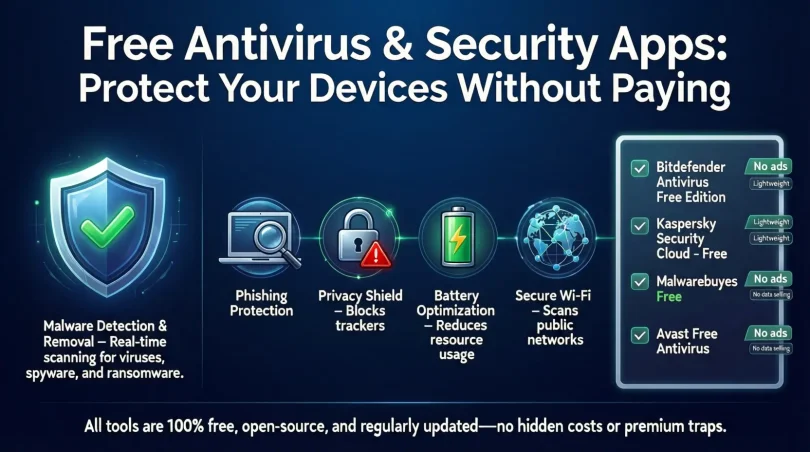
Free antivirus & security apps are software programs designed to detect, block, and remove malicious software from your devices. These apps offer protection against viruses, malware, spyware, ransomware, and other cyber threats that can harm your system or steal your personal information. Unlike paid security software, free versions provide essential security features without any cost.
These apps typically offer:
- Real-time scanning of files and programs.
- Automatic updates to stay ahead of new threats.
- Safe browsing tools to prevent phishing attacks.
- System performance optimization features in some cases.
For beginners, these apps are an excellent way to start securing devices without complex setups or subscriptions. Some popular free antivirus apps even support multiple platforms, including Windows, macOS, Android, and iOS.
While free apps may have limitations, such as fewer advanced features compared to premium versions, they are still highly effective for basic protection. By using free antivirus & security apps, users can ensure that everyday internet activities, like online banking, social media, and email, remain safe from cyber threats.
Why is Free Antivirus & Security Apps Important?

In the digital era, cyber threats are everywhere. From downloading files to visiting websites, every online activity carries potential risks. Using free antivirus & security apps is crucial because:
- Protects Personal Data – Cybercriminals often target sensitive information such as passwords, banking details, and personal documents. Antivirus apps help prevent unauthorized access.
- Prevents Malware Attacks – Malware can slow down your system, corrupt files, or even make your device unusable. Regular scanning helps avoid these problems.
- Safe Online Browsing – Many apps provide web protection features, which warn you about dangerous websites or suspicious links.
- Cost-Effective Security – You don’t need to invest in expensive software for basic protection. Free apps offer enough coverage for everyday users.
- Peace of Mind – Knowing your device is protected reduces stress and allows you to use technology more confidently.
Even if you are careful online, threats can appear unexpectedly. Free antivirus apps act as a safety net, protecting your devices without requiring advanced technical knowledge.
Detailed Step-by-Step Guide to Using Free Antivirus & Security Apps
Using free antivirus apps is simple. Here’s a complete guide:
Step 1: Choose the Right App
Selecting a reliable antivirus app is the first step. Consider:
- Compatibility with your device.
- Real-time protection capabilities.
- Regular updates.
- User reviews and reputation.
Some well-known free antivirus apps include Avast Free Antivirus, AVG AntiVirus Free, Bitdefender Antivirus Free Edition, and Kaspersky Security Cloud Free.
Step 2: Download and Install
- Visit the official website of the antivirus app.
- Download the free version compatible with your device.
- Follow on-screen instructions for installation.
- Avoid downloading apps from unknown sources to prevent fake antivirus software.
Step 3: Update Virus Definitions
- After installation, update the virus definitions immediately.
- Updates ensure the app can detect the latest malware threats.
- Most apps offer automatic updates, but manual updates are also possible.
Step 4: Run an Initial Scan
- Perform a full system scan after installation.
- The app will check all files, programs, and drives for potential threats.
- Quarantine or delete any detected malware.
Step 5: Enable Real-Time Protection
- Activate real-time protection to monitor ongoing activities.
- This feature automatically blocks malicious files and suspicious activities.
Step 6: Schedule Regular Scans
- Set up automatic scans weekly or daily, depending on your usage.
- Regular scans help maintain a clean and secure system.
Step 7: Use Additional Features
- Many free apps offer extra tools like password managers, firewall protection, or VPN access.
- Explore these features to enhance your security.
By following these steps, even beginners can fully utilize free antivirus & security apps to keep devices safe.
Benefits of Free Antivirus & Security Apps
Using free antivirus apps provides multiple advantages:
- Cost-Free Protection – Get essential security without paying.
- Easy to Use – User-friendly interfaces are suitable for beginners.
- Real-Time Malware Detection – Continuous monitoring to prevent attacks.
- Safe Browsing – Blocks malicious websites and phishing links.
- Multi-Platform Support – Available for computers, smartphones, and tablets.
- Lightweight Performance – Most free apps don’t slow down your device significantly.
- Regular Updates – Stay protected against the latest threats.
These benefits make free antivirus apps an excellent starting point for personal or home use, especially for users who are just beginning to explore digital security.
Disadvantages / Risks
While free antivirus apps are useful, they come with some limitations:
- Limited Features – Advanced tools like firewalls, VPNs, or parental controls may be missing.
- Advertisements – Free versions may show ads or prompt upgrades.
- Lower Priority Support – Customer support may be limited compared to premium versions.
- False Sense of Security – Users may assume complete protection, which is not always true.
- Data Collection – Some free apps may collect user data for analytics.
Understanding these risks helps users balance convenience and security while making informed decisions.
Common Mistakes to Avoid
Many users unknowingly reduce the effectiveness of free antivirus apps. Avoid these mistakes:
- Ignoring Updates – Outdated virus definitions can’t protect against new malware.
- Running Multiple Antivirus Programs – Using two apps simultaneously may cause conflicts.
- Downloading from Unknown Sources – Fake antivirus programs can infect your device.
- Disabling Real-Time Protection – Leaving this off reduces security.
- Assuming Free Equals Full Protection – Free apps cover basics but not advanced threats.
- Neglecting Safe Online Habits – Clicking on unknown links or downloading unverified files can bypass antivirus protections.
By avoiding these errors, users can maximize the effectiveness of free security apps.
FAQs About Free Antivirus & Security Apps
1. Can free antivirus protect against all malware?
No. Free antivirus apps provide essential protection against most common threats but may not cover advanced malware, ransomware, or targeted attacks.
2. Are free antivirus apps safe to use?
Yes, as long as you download them from official sources. Avoid third-party sites to prevent fake or malicious software.
3. How often should I scan my device?
For regular users, weekly scans are sufficient. Heavy users or those downloading files often should scan daily.
4. Can free antivirus slow down my device?
Most free apps are lightweight and won’t noticeably affect performance. However, full scans may temporarily slow down older systems.
5. Do free antivirus apps expire?
No, they remain free indefinitely, but some features may be limited, and occasional upgrade prompts may appear.
6. Is real-time protection important?
Yes. Real-time protection continuously monitors files, programs, and websites, preventing threats before they cause harm.
7. Can free antivirus apps replace paid software?
For beginners and casual users, free antivirus is sufficient. Advanced users or businesses may require premium features for comprehensive protection.
8. Are free antivirus apps compatible with all devices?
Most apps support Windows, macOS, Android, and iOS. Check compatibility before downloading to ensure proper functionality.
Expert Tips & Bonus Points
- Use Multiple Layers of Security – Combine antivirus with browser security features and strong passwords.
- Regular Backups – Always back up important files in case of malware attacks.
- Be Cautious Online – Avoid clicking unknown links, downloading pirated content, or sharing passwords.
- Review Settings – Customize notifications, scanning schedules, and real-time protection options.
- Upgrade If Needed – If you require advanced features, consider a premium version for enhanced security.
- Educate Yourself – Learn about common cyber threats to complement your antivirus protection.
These expert practices help you maintain a secure digital environment while relying on free antivirus apps.
Conclusion
Free antivirus & security apps are a practical and cost-effective way to protect your devices from everyday threats. They offer real-time protection, malware detection, and safe browsing features that make cybersecurity accessible even to beginners. While they may not include advanced tools like firewalls or premium support, they provide sufficient security for personal and home use.
By choosing reliable apps, keeping them updated, and following safe online practices, users can confidently navigate the digital world without worrying about viruses, malware, or cyber-attacks. Remember, technology is only as secure as the habits of the user. Combining free antivirus apps with smart online behavior ensures that your devices remain protected without any cost.
Investing time in learning about these apps and using them correctly pays off in peace of mind, secure data, and worry-free internet use. Even for beginners, free antivirus apps are an essential first step toward comprehensive digital safety.