
Introduction
In today’s digital age, students have access to countless tools that make learning faster, easier, and more enjoyable. Free tech tools for students are especially valuable because they allow learners to enhance their skills without spending money. Whether it’s for writing assignments, creating presentations, managing projects, or collaborating with classmates, technology can be a game-changer in education.
Using the right tools not only saves time but also improves the quality of work. Many students struggle with organization, time management, or understanding complex concepts, and this is where tech tools come in. They can simplify tasks like note-taking, coding, designing, or even learning a new language.
In this article, we will explore the concept of free tech tools for students, why they are important, and provide a detailed guide to the most effective ones. We will also look at their benefits, potential risks, and common mistakes students make while using these tools. By the end, you’ll have expert tips and actionable advice to make the most of these resources.
Using free tech tools strategically can help you stay ahead in academics while developing skills that are valuable in the real world. Let’s dive into the world of student-friendly tech tools and see how they can transform your learning experience.
What is Free Tech Tools for Students?
Free tech tools for students are digital applications, platforms, or software designed to assist learners in different aspects of education without any cost. These tools cover a wide range of functions including:
- Writing and editing documents
- Research and note-taking
- Time management and productivity
- Graphic design and multimedia projects
- Online learning and tutorials
The primary goal of these tools is to make learning more interactive, organized, and efficient. Unlike paid software, free tools provide essential features that students need while staying accessible to everyone. For example, Google Docs allows collaborative writing, Trello helps in task management, and Canva supports easy design creation—all free of charge.
Free tech tools are especially helpful for students who want to maximize their potential without worrying about expenses. They are usually cloud-based, which means students can access their work from any device, anywhere. Additionally, many of these tools are intuitive and beginner-friendly, making them suitable for students of all ages and skill levels.
In short, free tech tools are the bridge between traditional studying methods and modern digital learning. They help students save time, stay organized, and enhance their learning experience in a cost-effective way.
Why is Free Tech Tools for Students Important?

Using free tech tools for students is not just a convenience; it’s increasingly becoming a necessity. Here’s why:
- Improves Productivity
Students often juggle multiple assignments, projects, and exams. Tools like task managers and calendar apps help track deadlines, prioritize work, and reduce stress. - Enhances Learning
Interactive platforms, educational videos, and simulation tools make learning engaging and memorable. They transform passive reading into active learning. - Encourages Collaboration
With tools like Google Workspace or Microsoft Teams, students can work together on projects, share ideas, and receive real-time feedback. - Cost-Effective Learning
Most students have limited budgets. Free tech tools provide high-quality features without requiring subscriptions or fees. - Develops Digital Skills
By using these tools, students gain experience with software and apps commonly used in universities and workplaces, giving them a competitive advantage. - Organization and Time Management
Tools for note-taking, project tracking, and scheduling help students manage their studies efficiently, ensuring nothing is missed.
Overall, free tech tools are essential because they support students in multiple dimensions of their academic life. They save time, improve output, and prepare students for a digital-first world.
Detailed Step-by-Step Guide to Free Tech Tools for Students
Here is a comprehensive guide on some of the most effective free tech tools for students, categorized by purpose.
1. Writing and Editing Tools
Google Docs
- Allows real-time collaboration and editing
- Auto-saves work to the cloud
- Features spelling and grammar check
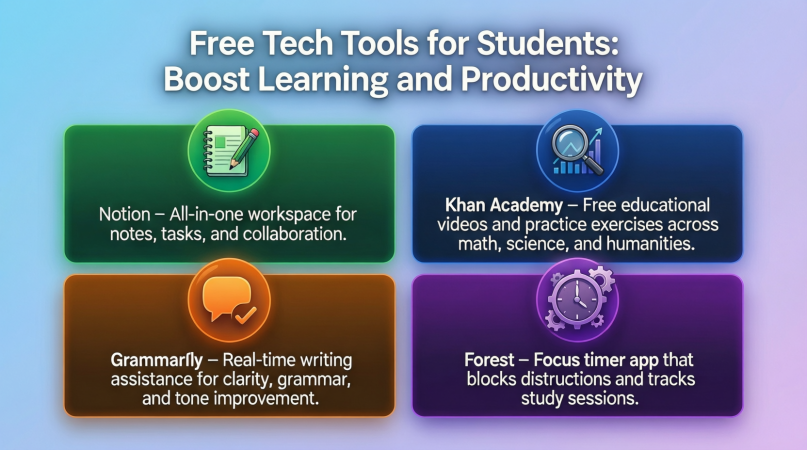
Grammarly Free Version
- Detects grammar, spelling, and punctuation errors
- Suggests better sentence structure
- Supports multiple platforms, including web and email
Hemingway Editor
- Helps write clear and concise content
- Highlights complex sentences and passive voice
- Useful for essays, reports, and assignments
2. Note-Taking and Organization Tools
Evernote
- Organizes notes into notebooks
- Supports images, links, and audio notes
- Syncs across devices
Microsoft OneNote
- Offers digital notebooks for subjects
- Easy to organize and search notes
- Integrates with Microsoft Office apps
Notion
- Combines note-taking, task management, and databases
- Offers templates for study planners
- Useful for long-term project tracking
3. Time Management and Productivity Tools
Trello
- Visual task boards for organizing work
- Use checklists, deadlines, and labels
- Great for group projects
Google Calendar
- Schedule study sessions, exams, and reminders
- Syncs across devices
- Allows sharing calendars with classmates
Focus Booster
- Pomodoro timer to enhance focus
- Tracks work sessions and breaks
- Helps avoid procrastination
4. Learning and Research Tools
Khan Academy
- Offers free courses on math, science, history, and more
- Interactive exercises with progress tracking
- Video lessons simplify complex topics
Coursera Free Courses
- Free access to selected university courses
- Learn at your own pace
- Certificates available for some free courses
Quizlet
- Create digital flashcards for memorization
- Test knowledge through games and quizzes
- Share sets with classmates for collaborative study
5. Design and Creativity Tools
Canva Free Version
- Drag-and-drop design platform
- Templates for presentations, posters, and infographics
- Suitable for both beginners and advanced users
Pixlr
- Online photo editor with advanced features
- Supports layers, effects, and filters
- Free alternative to Photoshop
Tinkercad
- 3D design and modeling tool for beginners
- Ideal for STEM students and makers
- Free and easy to use
6. Coding and STEM Tools
Scratch
- Beginner-friendly programming platform
- Helps learn coding through visual blocks
- Ideal for students learning software logic
CodePen Free Version
- Online code editor for HTML, CSS, and JavaScript
- Test and share coding projects easily
- Great for web development practice
GeoGebra
- Free math software for geometry, algebra, and calculus
- Interactive graphs and simulations
- Enhances visual learning
7. Collaboration and Communication Tools
Google Meet
- Free video conferencing for group discussions
- Screen sharing and recording features
- Works well for remote group projects
Slack Free Version
- Team communication with channels and messaging
- Integrates with productivity apps
- Keeps project discussions organized
Discord
- Chat platform for student communities and study groups
- Voice, video, and text channels
- Ideal for peer collaboration
Benefits of Free Tech Tools for Students
- Cost Savings: No subscription fees required.
- Improved Organization: Keep notes, projects, and deadlines in one place.
- Better Collaboration: Work with peers seamlessly.
- Time Management: Plan tasks and track productivity efficiently.
- Enhanced Learning: Interactive lessons and tutorials improve understanding.
- Accessibility: Work from any device, anytime.
- Skill Development: Gain digital skills relevant for higher education and careers.
- Creativity Boost: Design, coding, and multimedia tools enhance creative thinking.
Disadvantages / Risks
- Limited Features: Free versions may lack advanced tools available in paid versions.
- Storage Restrictions: Some cloud tools have limited storage.
- Privacy Concerns: Sensitive data may be vulnerable if accounts are not secured.
- Distractions: Easy access to other apps can lead to procrastination.
- Internet Dependence: Many tools require a stable internet connection.
- Learning Curve: Some tools may take time to master fully.
Common Mistakes to Avoid
- Overloading Tools: Trying to use too many apps at once can be confusing.
- Ignoring Security: Not using strong passwords or enabling two-factor authentication.
- Neglecting Backups: Failing to back up work outside the app can lead to data loss.
- Relying Only on Free Tools: Sometimes, basic versions may not meet all academic needs.
- Skipping Tutorials: Not learning the full features reduces tool efficiency.
- Poor Time Management: Misusing productivity apps without a clear plan.
FAQs About Free Tech Tools for Students
1. Are free tech tools really safe to use for students?
Yes, most reputable tools like Google Docs, Canva, and Trello have robust security measures. Always use strong passwords and enable two-factor authentication for extra safety.
2. Can I use these tools offline?
Some tools, like Google Docs or Canva, offer offline modes. However, many features require internet access, especially collaborative ones.
3. Do free tools have limitations compared to paid versions?
Yes, free versions may have limited storage, fewer templates, or restricted advanced features. But they are usually sufficient for student needs.
4. Which tools are best for collaborative projects?
Google Docs, Google Meet, Slack, and Trello are excellent for group work, as they allow real-time updates and communication.
5. Can free tech tools improve learning outcomes?
Absolutely. Tools like Khan Academy, Quizlet, and GeoGebra make learning interactive, helping students understand and retain concepts better.
6. Are there tools for coding beginners?
Yes, Scratch and CodePen are beginner-friendly platforms where students can practice coding and web development skills.
7. How can students avoid distractions while using these tools?
Using Pomodoro timers, focus apps, or browser extensions that block distracting websites can help maintain focus during study sessions.
8. Are free design tools suitable for academic presentations?
Yes, Canva and Pixlr offer templates and editing tools that make academic presentations visually appealing and professional.
Expert Tips & Bonus Points
- Plan Before Using Tools: Outline your tasks and goals before choosing an app.
- Use Templates: Save time by starting with templates in Canva or Notion.
- Combine Tools: For example, use Trello for task tracking and Google Docs for content creation.
- Regularly Update Skills: Explore tutorials and webinars to unlock hidden features.
- Backup Work Frequently: Use Google Drive or external storage to prevent data loss.
- Focus on One Tool at a Time: Master a few tools rather than juggling many.
- Engage in Communities: Join student forums or Discord groups for tips and support.
Conclusion
Free tech tools for students have revolutionized learning by making it more efficient, interactive, and cost-effective. They help students organize work, collaborate effectively, and develop valuable skills while saving time and money. Whether it’s writing, designing, coding, or managing projects, there is a tool available to meet every academic need.
However, using these tools wisely is essential. Students should focus on security, avoid distractions, and learn the tools thoroughly to maximize their benefits. With consistent use, free tech tools can significantly enhance productivity, understanding, and creativity.
In today’s competitive educational environment, mastering free tech tools gives students an edge. By integrating them into daily study routines, learners not only improve academic performance but also acquire digital skills that are crucial for higher education and future careers. Investing time in learning and using these tools effectively can transform the study experience, making education more organized, interactive, and enjoyable.