
Introduction
In today’s digital world, network security has become a critical concern for businesses, educational institutions, and individuals alike. Cyber threats, hacking attempts, and data breaches are becoming increasingly sophisticated. This makes protecting your network a top priority. One of the most effective ways to safeguard your network is by using. Network security tools These tools not only detect vulnerabilities but also prevent unauthorized access and minimize risks.
Network security tools are designed to monitor traffic, identify threats, and respond quickly to any potential attacks. Whether you are running a small office network or managing enterprise-level systems, understanding and using the right network security tools can save time, money, and reputation. Beginners may find the topic overwhelming initially, but with the right guidance, it becomes manageable and even empowering.
In this comprehensive guide, we will explore what network security tools are, why they are essential, how to use them effectively, and some common mistakes to avoid. By the end, you will have a clear understanding of how to protect your network from cyber threats using the right strategies and tools.
What is Network Security Tools?
Network security tools are software programs or hardware devices designed to protect digital networks from unauthorized access, attacks, and data breaches. They work by monitoring network traffic, analyzing potential threats, and implementing security measures to maintain system integrity.
Some of the most common network security tools include:
- Firewalls
- Intrusion Detection Systems (IDS)
- Antivirus and Anti-malware software
- Network analyzers and scanners
- VPNs (Virtual Private Networks)
- Encryption tools
These tools help administrators detect unusual activities, block harmful traffic, and ensure that sensitive data remains secure. Simply put, network security tools act as the first line of defense against cyber attacks.
For example, a firewall filters incoming and outgoing traffic to prevent malicious content from entering your network, while an intrusion detection system alerts you when suspicious behavior is detected. Combined, these tools provide a multi-layered approach to securing digital environments.
Why is Network Security Tools Important?

Network security tools are vital because cyber threats can cause severe financial and reputational damage. Without proper security measures, networks are vulnerable to:
- Data theft
- Malware infections
- Unauthorized access
- Ransomware attacks
- Phishing scams
Implementing [PRIMARY KEYWORD] ensures that all devices connected to a network are monitored and protected. Businesses, for example, can prevent unauthorized employees or hackers from accessing sensitive customer information. Similarly, schools and universities can protect student data from cybercriminals.
Moreover, using network security tools increases overall productivity. A secure network reduces downtime caused by malware or attacks. Employees can work without fear of data loss, and IT teams can focus on growth rather than constant troubleshooting.
Cybersecurity regulations and laws also make it mandatory for organizations to secure their networks. Failure to comply with these regulations can result in heavy fines and legal issues. By investing in the right network security tools, organizations not only safeguard their data but also maintain trust and credibility with clients and stakeholders.
Detailed Step-by-Step Guide to Using Network Security Tools
Using network security tools effectively requires proper planning and implementation. Here is a step-by-step guide to help beginners and intermediates secure their networks efficiently.
Step 1: Identify Your Network Needs
Before selecting any tool, assess your network size, type, and vulnerabilities. Ask yourself:
- How many devices are connected?
- What type of data is stored or transmitted?
- What level of security do you need?
For small businesses, basic firewalls and antivirus software may suffice. Larger organizations may require advanced IDS, SIEM systems, and encryption protocols.
Step 2: Choose the Right Tools
Not all tools are suitable for every network. Depending on your needs, consider:
- Firewalls for blocking unauthorized access
- Antivirus/Anti-malware to prevent infections
- Intrusion Detection Systems for real-time monitoring
- VPNs for secure remote access
- Encryption tools for protecting sensitive data
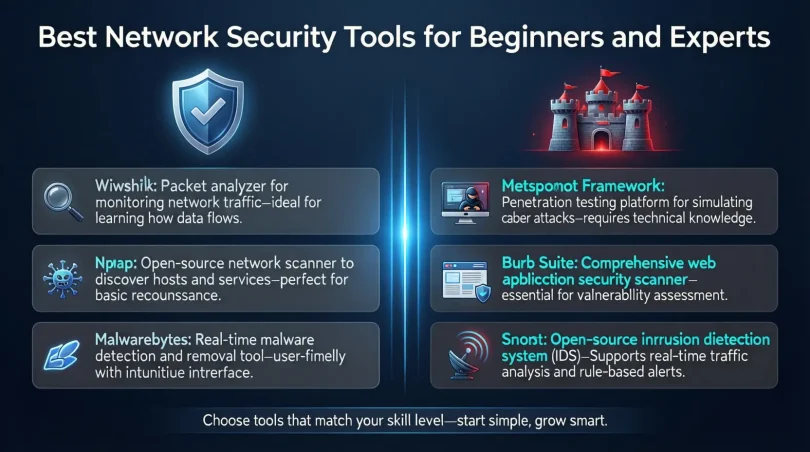
Some popular network security tools include Wireshark, Snort, Nessus, and pfSense. Beginners should start with tools that have a user-friendly interface and reliable customer support.
Step 3: Install and Configure Tools Properly
Installing the tools correctly is crucial. Follow these tips:
- Read the installation guides thoroughly
- Update software to the latest version
- Configure settings according to your network policy
- Enable automatic updates for real-time protection
For example, when setting up a firewall, define rules for incoming and outgoing traffic. Block unnecessary ports and restrict access based on IP addresses.
Step 4: Monitor Network Activity
Once the tools are installed, constant monitoring is necessary. Check for:
- Unusual login attempts
- High traffic from unknown sources
- Unidentified devices connected to the network
Regular monitoring allows you to respond quickly before threats escalate. Tools like IDS and network analyzers provide alerts and detailed reports for better decision-making.
Step 5: Perform Regular Security Audits
Regular audits help identify vulnerabilities and improve network security. Steps include:
- Conduct penetration tests to simulate cyber attacks
- Scan for outdated software or weak passwords
- Review logs for unusual activity
- Update security policies as needed
Audits not only enhance security but also ensure compliance with industry standards.
Step 6: Train Employees on Network Security
Human error is a major cause of data breaches. Provide training on:
- Recognizing phishing emails
- Using strong passwords
- Accessing the network securely
- Reporting suspicious activity
A well-informed team acts as an additional layer of defense, complementing your network security tools.
Benefits of Network Security Tools
Using [PRIMARY KEYWORD] provides numerous advantages:
- Protection from cyber attacks: Blocks malware, ransomware, and hackers.
- Data privacy: Keeps sensitive information secure.
- Regulatory compliance: Meets cybersecurity laws and standards.
- Reduced downtime: Prevents network interruptions and system failures.
- Cost savings: Avoids financial losses caused by breaches.
- Improved productivity: Ensures smooth network operation.
- Real-time monitoring: Detects and alerts about threats immediately.
- Enhanced reputation: Builds trust among clients and stakeholders.
For example, a company using network security tools will have fewer disruptions and a more secure workflow, resulting in better customer satisfaction and operational efficiency.
Disadvantages / Risks
While network security tools are essential, there are some risks and limitations:
- High cost: Advanced tools can be expensive for small businesses.
- Complexity: Some tools require technical expertise to configure properly.
- False positives: Alerts may sometimes identify safe activity as threats.
- Performance issues: Heavy security programs can slow down networks.
- Regular maintenance required: Tools must be updated and monitored continuously.
- Limited protection: No tool can guarantee 100% security against all threats.
Understanding these disadvantages helps you plan better and ensures you do not solely rely on software for protection.
Common Mistakes to Avoid
Many beginners make mistakes that reduce the effectiveness of network security tools. Avoid the following:
- Ignoring updates: Outdated software leaves your network vulnerable.
- Using weak passwords: Strong, unique passwords are essential.
- Neglecting backups: Always have backup plans for critical data.
- Over-reliance on tools: Combine technology with good practices.
- Poor configuration: Incorrect settings can create security gaps.
- Lack of monitoring: Tools must be actively monitored, not just installed.
- Ignoring employee training: Users can accidentally compromise security.
FAQs About Network Security Tools
1. What is the best network security tool for beginners?
For beginners, tools like Avast, Bitdefender, or basic firewalls are user-friendly and effective. They offer intuitive interfaces and essential protection features.
2. How often should I update my network security tools?
Updates should be installed immediately when released. Regular updates fix vulnerabilities and protect against new threats.
3. Can network security tools prevent hacking completely?
While they significantly reduce risks, no tool guarantees 100% protection. Combining tools with strong passwords and safe practices increases security.
4. Are network security tools expensive?
Costs vary. Some free tools provide basic protection, while advanced tools for enterprises may be costly. Consider your network needs before purchasing.
5. Do I need technical knowledge to use network security tools?
Basic tools are easy to use, but advanced tools like IDS or SIEM systems require technical expertise. Training or professional support may be needed.
6. What is the difference between a firewall and antivirus?
A firewall controls incoming and outgoing network traffic, while antivirus software scans and removes malicious files from your devices. Both work together to protect your network.
7. Can network security tools work on home networks?
Yes, many tools are designed for home users, including VPNs, antivirus, and firewalls. They are effective for personal data protection.
8. How do I know if my network security tools are effective?
Check logs, alerts, and performance metrics. Regular audits and penetration tests also indicate how well your tools are protecting the network.
Expert Tips & Bonus Points
- Layered security approach: Combine firewalls, antivirus, IDS, and encryption for better protection.
- Use strong passwords: Change passwords regularly and avoid repetition.
- Enable multi-factor authentication (MFA): Adds an extra security layer for login systems.
- Regular backups: Protect critical data from ransomware and accidental loss.
- Segment your network: Separate critical systems from general users to reduce risk exposure.
- Monitor network logs: Identify unusual activity before it becomes a major issue.
- Educate users: Continuous training improves overall security posture.
- Test your tools: Conduct regular penetration tests to evaluate effectiveness.
Implementing these tips ensures that your network security tools work efficiently and your network remains secure against evolving cyber threats.
Conclusion
Network security tools are essential for protecting your systems, data, and users from cyber threats. With the rise in digitalization, relying on basic measures is no longer sufficient. Tools like firewalls, IDS, antivirus software, and VPNs provide multiple layers of security to detect, prevent, and respond to potential attacks.
By understanding what network security tools are, why they are important, and how to use them effectively, you can safeguard your network without overwhelming complexity. Regular monitoring, proper configuration, and continuous employee training complement these tools, making your network resilient against evolving cyber threats. While challenges like cost, false positives, or technical complexity exist, the benefits far outweigh the risks. Investing time and resources into network security tools ensures the safety of your data, the trust of your clients, and the uninterrupted operation of your network.
With careful planning, strategic implementation, and ongoing management, network security tools become not just a necessity but a powerful ally in maintaining a secure and productive digital environment. Start today, and build a network that is robust, protected, and future-ready.