
Introduction
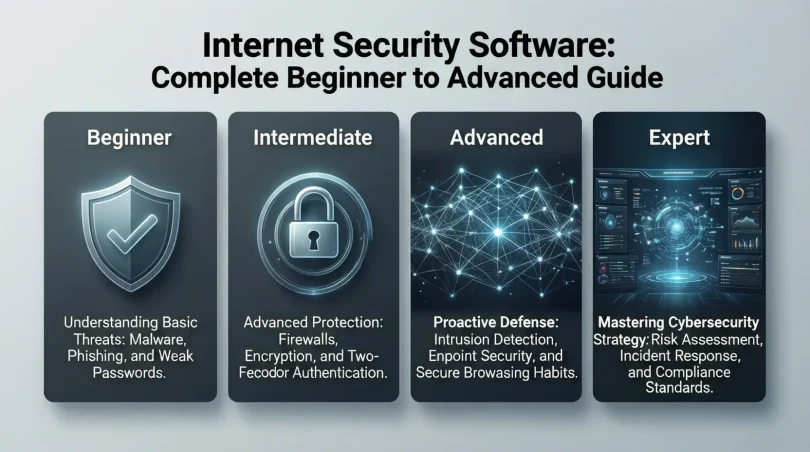
Internet Security Software In today’s digital world, staying safe online is no longer optional. Every day, people use the internet for banking, shopping, work, study, and communication. While the internet makes life easier, it also creates serious risks. Hackers, viruses, scams, and data theft are growing rapidly. This is why Internet security software has become an essential tools for everyone, from beginners to experienced users.
Internet security software protects your devices, personal information, and online activities from cyber threats. Without proper protection, your passwords, photos, emails, and financial details can easily fall into the wrong hands. Many people believe they are not targets, but cybercriminal attack both individuals and businesses equally.
As technology grows, cyber threats become smarter and more dangerous. Simple antivirus programs are no longer enough. Modern Internet security software provides complete protection, including malware defense, firewall security, identity protection, and real-time monitoring.
This article is written to help you fully understand Internet security software in simple words. Whether you are a student, professional, business owner, or home user, this guide will help you choose, use, and benefit from the right security solution. By the end, you will know why online security matters and how to protect yourself confidently in today’s connected world.
What Is Internet Security Software?
Internet security software is a digital protection system designed to secure devices, networks, and online activities from cyber threats. It acts as a shield between your device and the dangers present on the internet.
Unlike basic antivirus programs, Internet security software offers advanced protection. It guards against viruses, malware, ransomware, phishing attacks, spyware, and unauthorized access. It works continuously in the background to detect and stop threats before they cause damage.
This software is used on computers, laptops, smartphones, tablets, and even smart home devices. Many solutions also include features such as secure browsing, email protection, password management, and parental controls.
In simple terms, Internet security software keeps your digital life safe, private, and secure while you browse, shop, work, or communicate online.
Why Is Internet Security Software Important?

Internet security software is important because cyber threats are increasing every year. Hackers constantly look for weak systems to steal data, money, and identities.
Without proper protection, a single click on a fake email or website can lead to serious damage. Personal photos can be stolen, bank accounts hacked, and private information leaked. Businesses can lose customer trust and face legal issues.
Internet security software protects against these risks by offering real-time monitoring and automatic threat removal. It helps prevent identity theft, financial loss, and data breaches.
Additionally, this software ensures safe browsing for families and children. It blocks harmful websites and limits exposure to dangerous online content. Overall, it gives peace of mind and confidence while using the internet daily.
Detailed Step-by-Step Guide
Step 1: Identify Your Security Needs
Before choosing Internet security software, understand your needs. Consider how you use the internet, which devices you own, and what type of data you want to protect.
If you only browse and email, basic protection may work. If you shop online, manage finances, or run a business, you need advanced security features.
Step 2: Choose the Right Type of Protection
Internet security software comes in different types:
- Basic protection for casual users
- Advanced security for professionals
- Family protection with parental controls
- Business-grade solutions for companies
Choose software that matches your usage and risk level.
Step 3: Install the Software Properly
Download the software from an official source. Follow installation instructions carefully. Allow necessary permissions so the software can function fully.
After installation, restart your device if required. This ensures all protection features activate correctly.
Step 4: Update Regularly
Cyber threats change constantly. Internet security software must be updated regularly to stay effective. Enable automatic updates for the best protection.
Updates include new virus definitions, security patches, and improved performance features.
Step 5: Run Regular Scans
Schedule automatic scans to check for hidden threats. Regular scanning ensures your device stays clean and secure.
You can also perform manual scans if you suspect suspicious activity.
Step 6: Enable Additional Features
Most Internet security software offers extra features such as:
- Firewall protection
- Secure browsing mode
- Email filtering
- Password managers
- Identity theft alerts
Enable these features for complete online safety.
Benefits of Internet Security Software
- Protects against viruses, malware, and ransomware
- Prevents identity theft and data breaches
- Ensures safe online shopping and banking
- Provides real-time threat detection
- Blocks phishing and fake websites
- Improves system performance by removing threats
- Offers parental control for family safety
- Gives peace of mind during internet use
Disadvantages / Risks
- Some software can slow down older devices
- Premium versions may be costly
- False alerts can sometimes occur
- Requires regular updates and monitoring
- Poor-quality software may provide weak protection
Common Mistakes to Avoid
One common mistake is relying only on free or outdated software. Free versions often lack advanced protection and updates.
Another mistake is ignoring software updates. Outdated Internet security software cannot protect against new threats.
Some users disable security features to improve speed, which increases risk. Always keep protection enabled.
Using multiple security programs together can cause conflicts. Stick to one reliable solution.
Finally, never ignore warning alerts. Security notifications exist to protect you from real danger.
FAQs
What does Internet security software protect against?
Internet security software protects against viruses, malware, spyware, phishing attacks, ransomware, and unauthorized access.
Is Internet security software different from antivirus?
Yes, antivirus is part of Internet security software, but Internet security offers broader protection, including firewall and identity security.
Can Internet security software protect mobile devices?
Yes, many solutions provide protection for smartphones and tablets against malicious apps and unsafe websites.
Do I need Internet security software if I am careful online?
Yes, even careful users can fall victim to advanced cyber threats. Protection adds an extra safety layer.
How often should I update Internet security software?
Updates should be automatic and frequent. Daily updates are recommended for strong protection.
Is paid Internet security software worth it?
Paid versions offer better features, customer support, and stronger protection, making them worth the investment.
Expert Tips & Bonus Points
Always use strong, unique passwords along with Internet security software. Enable two-factor authentication where possible.
Back up important data regularly. Security software protects data, but backups ensure recovery if needed.
Avoid clicking on unknown links or downloading suspicious files, even with protection enabled.
Review security reports to understand threats and improve online habits.
Teach family members about safe internet practices for overall digital safety.
Conclusion
Internet security software is no longer a luxury; it is a necessity in today’s digital world. As cyber threats continue to grow, protecting personal and professional data has become more important than ever. From preventing malware attacks to securing online transactions, this software plays a vital role in digital safety.
Using Internet security software ensures that your devices remain protected from both known and unknown threats. It gives you control over your online environment and helps you browse, shop, and communicate with confidence. Whether you are a beginner or an experienced user, the right security solution can make a significant difference.
By understanding how Internet security software works and using it correctly, you reduce risks and improve your overall digital experience. Regular updates, smart usage habits, and choosing reliable protection are key to staying safe online.
In a connected world, security equals peace of mind. Investing in strong Internet security software today helps protect your future, your privacy, and your digital freedom.